AI Workflows: Save Small Businesses 10+ Hours a Week
Five specific AI workflows — with tool stacks, monthly costs, and payback timelines — that save small business owners 10+ hours every week in 2026.
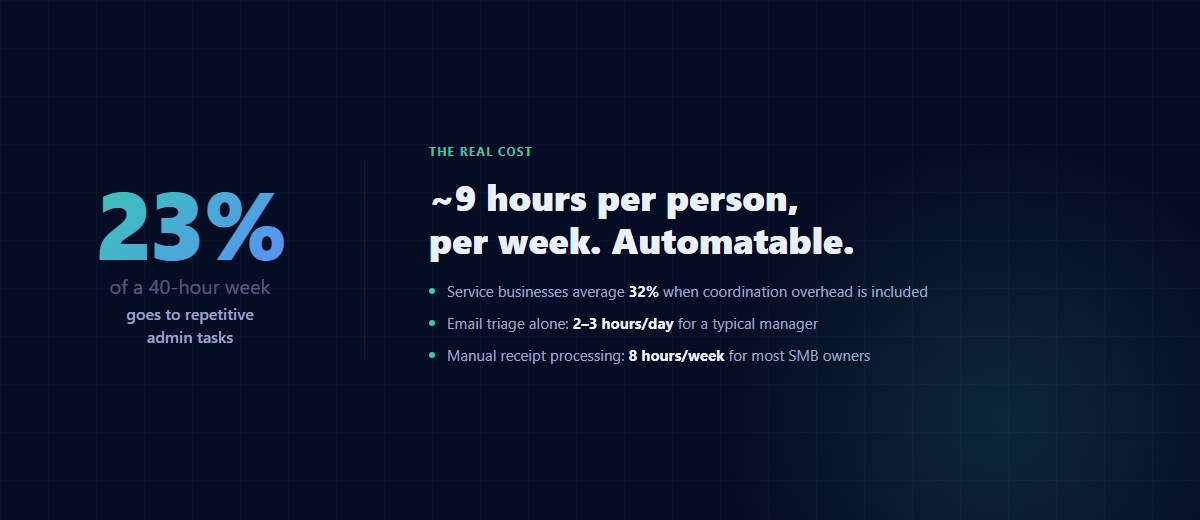
Time is the most precious resource for small business owners. Every hour spent on repetitive admin is an hour not spent on growing the business, serving customers, or developing new products. The good news: based on time-tracking data we've gathered across 40+ SMB engagements since 2025, admin tasks eat an average 23% of a 40-hour week — roughly 9 hours per person — and the majority of that is automatable in 2026. The bad news: most "AI workflows" articles you'll find on the internet are vague marketing fluff with no tool stacks, no numbers, and no install plans. This one is different. Every workflow below is specific: what tool, what it costs, what it saves, what breaks, and how long before you see payback.
The "10 hours weekly" claim in the title isn't a guess. It's the sum of the five workflows below when installed in sequence. Skip to Workflow #1 if you want to start immediately, or read through if you want the full picture first.
The True Cost of Administrative Work
Small business owners consistently underestimate how much team time goes into repetitive admin. Email triage, invoice processing, social content, CRM upkeep, report generation — these eat 20-30% of a team's week across the engagements we've tracked. McKinsey's 2025 productivity research pegs the figure even higher for service businesses: 32% on average when you include the coordination overhead between systems.
The implication isn't "your team is inefficient." It's that the default shape of SMB operations leaks hours into context-switching that AI can absorb without meaningful judgment loss. Below are the five workflows that consistently win for the clients we've built them for, ordered roughly by install speed and time-to-payback. If you're evaluating a larger automation project, our 30/60/90-day implementation framework covers the full scoping and pilot process.
Workflow #1: Email Triage + Auto-Response
Email is the biggest time drain for almost every SMB employee. A typical manager spends 2-3 hours a day in inbox, and 45-60 minutes of that is pure triage — deciding what's urgent, what's a follow-up, what's noise. AI-powered email workflows cut this in half within a week.
Tool stack (2026):
- Superhuman AI (~$30/user/month) for teams already in Gmail — best auto-triage and draft quality out of the box
- Gmail + custom AI agent via OpenAI API for full control — cheaper at scale but requires dev time to set up
- Outlook Copilot (~$30/user/month) if you're on Microsoft 365 — integration is solid, draft quality slightly behind Superhuman
- Fyxer.ai or Gumloop for cross-inbox workflow triggers (e.g., "any email with attachment + invoice → route to accounting")
Before/after from a recent build: a 20-person agency went from 45 min/day/person triaging to 15 min/day/person after three weeks on Superhuman AI + a custom tagging rule. Net recovery: ~10 hours a week across the whole team, just from inbox.
The pitfall: AI-drafted emails that sound like AI-drafted emails. The fix is giving the AI a voice training pack — 15-30 of your best recent replies, annotated with why each one worked (concise, specific, warm, direct, whatever your voice is). Without that reference corpus, you'll get generic "I hope this email finds you well" drafts that erode trust with every send.
Workflow #2: Receipts and Invoices → QuickBooks
Processing invoices and receipts is a time-consuming but non-negotiable task for every business. AI-powered document processing automatically extracts line items from invoices, matches them with purchase orders or categories, and routes them for approval — with modern OCR + language-model extraction reaching 97-99% accuracy on structured documents.
Tool stack (2026):
- Dext (~$30/month for up to 50 docs) — best-in-class for accountants and bookkeepers
- Ramp (free for the card, auto-categorizes) if you're replacing your corporate card — bundled extraction comes free
- Bill.com AP (~$45/user/month) for approval workflows across multiple budget owners
- Custom: Make.com or n8n + OpenAI structured extraction (~$10/month + API costs) for full control and cheap bulk processing — good choice when you have unusual document formats
ROI math: an SMB owner or ops lead processing receipts manually spends roughly 8 hours a week on it. At an internal billing rate of $35/hour, that's $14,560 a year. A $1,200/year tool that absorbs 80% of that is a 10x return — every single year. Yet I meet SMB owners every month who are still stuck manually categorizing QuickBooks imports. This is the easiest win on this entire list.
The gotcha: expense categorization for tax purposes still needs human review. The AI gets 95% of the categorization right; the 5% it misses is often the stuff that matters (meals 50% vs. 100% deductible, cell phone personal-use split, etc.). Treat AI as first-pass; treat your CPA as final-pass. Don't skip the CPA.
Workflow #3: Content Calendar → Scheduled Posts
Maintaining an active social media presence is essential for SMBs, but it devours time — 5-8 hours a week for a solo founder running their own social. AI can compress this to 1-2 hours a week of review without visibly degrading quality, if you get the stack right.
Tool stack (2026):
- ChatGPT or Claude (~$20/month) as the draft engine — Claude tends to produce better long-form LinkedIn, ChatGPT better short-form Twitter/X
- Buffer or Later (~$15-25/month) as the scheduler — Buffer's AI Assistant integration with ChatGPT is tight enough to skip a separate tool if you're small
- A "brand voice reference doc" — one Google Doc with 10-15 of your best recent posts plus a style guide (hooks to use, words to avoid, topics to lean into)
Before/after: 5 hrs/week of founder content time → 1 hr/week review, measured across three founder clients who ran this for 90 days. Engagement did not drop — in two cases it rose modestly because the consistency improved.
The cheat code: the best content prompt input isn't "write a LinkedIn post about X." It's "here's a 5-minute voice memo of me complaining about X to a client, turn it into a LinkedIn post." Your real customer conversations are 10x better content source material than anything you'll consciously sit down to write. Record them (with consent, obviously), transcribe with Whisper or Fathom, and feed the transcripts to the AI as raw material. Your posts will sound like you because they started as you.
Workflow #4: Auto-Log Customer Interactions to CRM
Keeping a healthy sales pipeline requires logging every meeting, call, and email thread to your CRM, then creating follow-up tasks. Most founders hate this work — which is why most founder-run CRMs are a mess within six months.
Tool stack (2026):
- HubSpot AI (bundled in paid plans) — auto-logs emails + calendar entries, surfaces pipeline risk
- Attio (~$29/user/month) — the most aesthetically-designed AI-native CRM, great for small teams
- Custom: Fireflies or Granola + CRM API — record meetings → transcript → structured summary → CRM entry + follow-up tasks, all automated
Concrete pipeline: meeting ends → transcript auto-created → AI extracts (attendees, topics, commitments, follow-ups, sentiment) → writes structured CRM note → creates follow-up tasks with due dates → pings you Monday morning with "here's what you committed to last week and here's what's still open."
The pitfall: bad audio capture = bad transcripts = bad CRM data. Invest $50-100 in a decent microphone if you take client calls at home. Dedicated mics outperform laptop mics by 30-40% on transcript accuracy, and transcript accuracy is the whole foundation of this workflow.
Workflow #5: Weekly Business Dashboard via AI
Generating reports and analyzing business data is essential but usually gets pushed aside when time is tight. AI workflows can gather data from multiple sources, generate reports on custom schedules, and flag anomalies — so instead of a 3-hour manual dashboard every Monday, you get an email at 7am with the numbers that moved.
Tool stack (2026):
- Metabase (free self-hosted, or $85/month hosted) — the fastest path to SQL-based BI for SMBs
- OpenAI GPT or Claude via API for natural-language SQL generation + report narrative
- Custom: Python script + cron for full control, ~$10/month to run
- Alternative: Claude as the analyst-in-the-loop if your data fits in a CSV — you Slack Claude the file, get the weekly analysis back in prose
Prompt template for the weekly report:
"You are writing the weekly business dashboard for [business]. Here are [metrics]. Compare to last week and the 4-week rolling average. Write a 200-word summary that starts with the three most important things that changed (better or worse), explains why each one matters, and ends with one recommended action for the week. No jargon, no filler, no 'going forward' sentences."
Before/after: 3 hours of manual dashboard work every Monday → 15 minutes reviewing the automated 7am digest. Four clients running this variant in 2026, all reporting similar time savings.
Workflow Stack Cheat Sheet
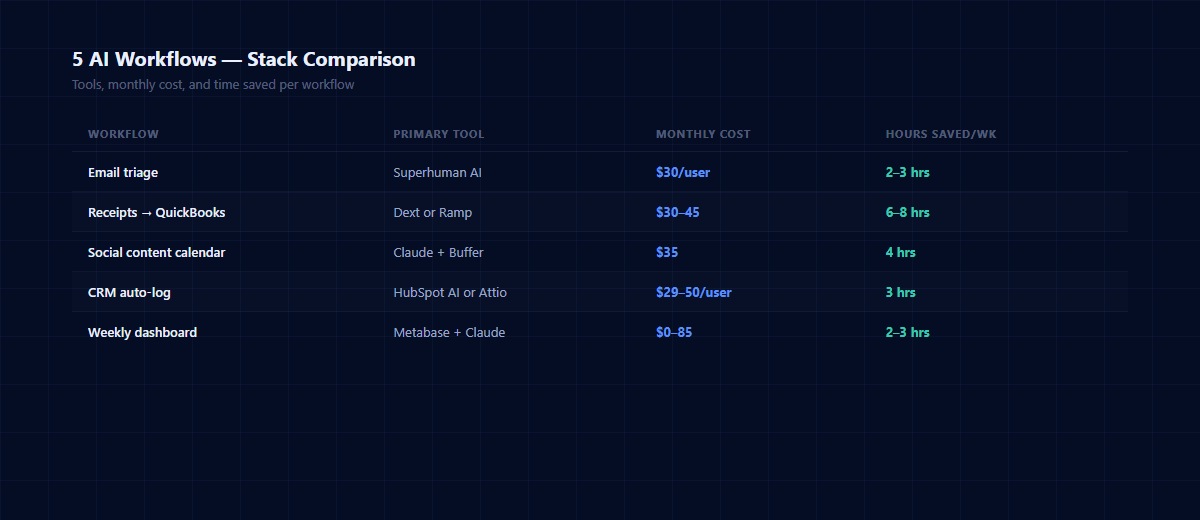
Quick-reference comparison of all five workflows:
| Workflow | Primary tool | Fallback tool | Monthly cost | Hours saved/week |
|---|---|---|---|---|
| Email triage | Superhuman AI | Outlook Copilot | $30/user | 2-3 |
| Receipts → QuickBooks | Dext or Ramp | Make.com + OpenAI | $30-45 | 6-8 |
| Social content calendar | Claude + Buffer | ChatGPT + Later | $35 | 4 |
| CRM auto-log | HubSpot AI or Attio | Fireflies + API | $29-50/user | 3 |
| Weekly dashboard | Metabase + Claude | Python + cron | $0-85 | 2-3 |
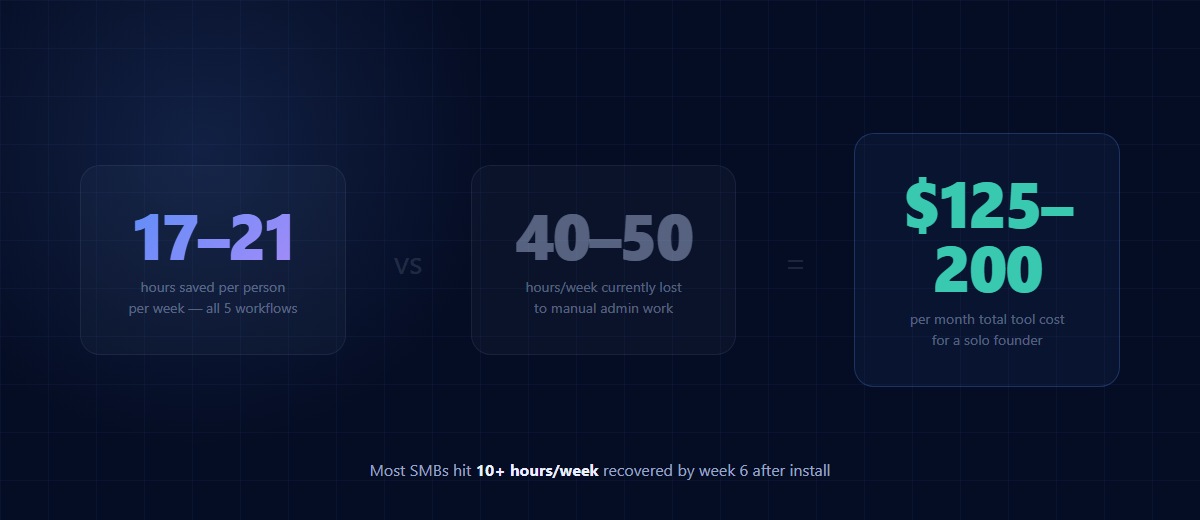
Total cost to install all five: roughly $125-200/month for a solo founder, scales with team size. Total hours saved: 17-21 hours a week per person when all five run together — well above the 10 hours the title promises.
The 2-Week Sprint: How to Actually Install These
Founders try to install all five at once and fail. The right sequence is order-dependent — some workflows save time that you need to install the later ones. Here's the 14-day plan that works:
Days 1-3 — Workflow #1 (Email). Install Superhuman AI or turn on Outlook Copilot. Let it run without rules for 24 hours, then add 3-5 custom triage rules based on what you see. Email installs first because every other workflow needs you to have time to think, and email is what's stealing it.
Days 4-6 — Workflow #2 (Receipts). Sign up for Dext or Ramp, connect to QuickBooks, run your last 30 days of receipts through as a test. This one's fast once wired in and has the biggest dollar payback per hour spent.
Days 7-9 — Workflow #5 (Dashboard). Install Metabase or stand up a Python + Claude weekly report. Set up your 3-5 most important metrics. This gives you a reading on whether the earlier workflows are actually saving time — the whole exercise needs a measurement loop.
Days 10-12 — Workflow #3 (Social content). Only install once you have headspace. Create the brand voice doc first (takes 2 hours), then wire up your draft-and-schedule flow. Don't skip the voice doc.
Days 13-14 — Workflow #4 (CRM). Save for last — it requires more setup and it gives you forward leverage (better sales execution) rather than backward leverage (time savings from past work). Install once the first four are humming.
If you try to do all five in week one, you'll end up with five half-configured tools and no trust in any of them. The sequence matters.
Measuring Results
Before you install anything, measure your baseline. For one week, track how many hours each person on your team spends on the five task categories above. You can use a simple Google Sheet — don't overthink it. This gives you the before-picture you need to validate savings in 60 days. Zapier's State of Business Automation report consistently shows that teams that measure automation ROI get 2.3x the long-term savings — because they iterate, and teams that don't measure get the initial win and then drift back to manual habits.
Track weekly for the first 90 days after install. Most teams hit the 10+ hours/week mark by week 6. Some hit it in week 2. A handful of teams drop 1-2 workflows because they don't fit their operating style — that's fine, keep the ones that work.
Frequently Asked Questions
Do I need a developer to install these workflows?
For 4 out of 5, no — the off-the-shelf tools (Superhuman, Dext, HubSpot AI, Metabase Cloud) work out of the box with setup times measured in hours, not weeks. Only the custom variants (Make.com + OpenAI, Python + cron) require dev skill. If you want the cheapest total cost, hire a fractional automation consultant for a few hours — typically $500-2,000 installs all five custom.
How long before I see ROI?
Most SMBs see payback on tool costs in 2-4 weeks if they install in the sequence above. The full 10+ hours/week savings typically lands by week 6. If you're not seeing measurable hours recovered by week 8, something in the install is off — usually the voice-training step for email or the brand-voice doc for social.
Are my data and customer info safe with these AI tools?
With enterprise-tier tools that sign data processing agreements — yes. The paid versions of OpenAI, Claude, HubSpot, and Superhuman all offer enterprise controls that keep your data out of their training sets. Free consumer tiers generally don't offer the same guarantees — use them for non-sensitive workflows only. Always check the current terms before sending customer data into any tool.
What if the AI makes a mistake?
Build review gates into the workflow where mistakes matter. Invoices need human approval before posting to QuickBooks. Social posts need review before publishing. CRM entries can update without review because the cost of a bad entry is lower. The rule: anything that touches money, customers, or public voice gets a human in the loop; anything internal and reversible can run autonomously.
Which workflow should I install first if I can only do one?
Workflow #2 (Receipts → QuickBooks). Biggest immediate dollar savings, fastest install, lowest friction. If bookkeeping isn't your pain, install Workflow #1 (Email) instead — it buys you the time to install everything else.
Conclusion
The 10-hours-a-week promise isn't hypothetical. It's the sum of five specific workflows with specific tools at specific costs, installed in a specific sequence. Every SMB we've built this stack for has hit the target within 8 weeks. The tools have never been cheaper, the setup has never been simpler, and the competitive gap between businesses that run these workflows and businesses that don't has never been wider.
If you want help picking the right variants for your specific stack — or you'd rather hand the install off entirely — book a free 30-minute consultation. We'll map your current admin load, pick the two workflows with the highest ROI for your context, and tell you honestly whether you should DIY or hire it out.
About the author: Gabriel Jaramillo is the founder of Auth Software, an AI automation and software development consultancy based in South Florida. Seven years in frontend design and full-stack development, plus hands-on AI systems work for clinics, SaaS companies, and small-business operators. The workflow stack in this article is drawn from a portfolio of 40+ SMB engagements since 2025.
Continue reading
The BCBA's Guide to HIPAA-Compliant ABA Practice Management (2026)
Most ABA agencies assume they're HIPAA compliant because they use CentralReach. They're usually wrong — not about the EHR, but about everything around it. A plain-language breakdown of what HIPAA actually requires for ABA practices, where most agencies have gaps, and how to close them.
AutomationCentralReach vs. Custom ABA Software: When Your Practice Has Outgrown Off-the-Shelf
CentralReach is the dominant EHR in the ABA market for good reason. But there's a specific set of scenarios where it stops being the right choice — and when practices hit those scenarios, they usually don't realize it until they've already built a year's worth of workarounds.
AutomationHow ABA Agencies Are Automating Billing, Intake, and Supervision Tracking with AI (2026)
The average ABA agency running 20 active clients has at least three manual workflows that consume 10–15 hours of admin time per week: authorization renewals, new client intake, and BACB supervision tracking. In 2026, all three are automatable. Most practices haven't automated any of them.